

Download GPX Editor – free Mac GPS track editor tool
Overview
GPX Editor is a dedicated desktop utility for macOS that allows hikers, cyclists, and GIS enthusiasts to open, edit, and fine‑tune GPX files directly on their Mac. Developed by William Modesitt, the application falls under the “Geography” category and targets users who need a reliable, lightweight editor without the overhead of a full‑blown GIS suite. First listed on Softonic on March 31st 2017, the current stable release is version 2.96.
While the software runs exclusively in English, its intuitive interface makes it accessible to anyone familiar with basic GPS terminology. GPX Editor supports the classic Mac OS and later versions, ensuring that even older hardware can benefit from its core functionality. The program is positioned as a free download, offering a secure way to manage track data, add waypoints, modify timestamps, and correct elevation errors before exporting the file for use in navigation devices or mapping services.
Its focus on simplicity does not mean a lack of power—advanced users can manipulate track segments, merge multiple files, and validate GPX schema compliance. In a world where mobile apps dominate GPS editing, GPX Editor fills the niche for desktop‑oriented workflows, giving power‑users a stable environment for batch processing and precise edits.
Key Features
What GPX Editor brings to the table
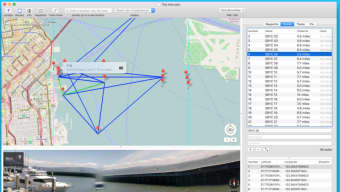
- Full‑screen GPX visualizer with zoom‑able map preview.
- Easy waypoint addition, deletion, and attribute editing (name, description, elevation, time).
- Track segment splitting and merging for complex route planning.
- Batch processing – apply the same edit to multiple GPX files at once.
- Built‑in validation tool that checks for schema errors and suggests fixes.
- Export options to standard GPX, KML, or CSV for compatibility with other platforms.
- Undo/redo history that preserves every change made during a session.
- Lightweight installer that occupies less than 20 MB on disk.
- Support for custom map tiles, letting users overlay tracks on topographic or satellite imagery.
- Secure, ad‑free experience – no hidden fees or in‑app purchases.
Installation, Usage & Compatibility
Step‑by‑step installation guide
Downloading GPX Editor is straightforward. Visit the official Softonic page or the developer’s website, click the “Download for Mac” button, and save the DMG file to your Downloads folder. Open the DMG, then drag the GPX Editor icon into your Applications folder. macOS may prompt you with a security warning because the app is not from the App Store; simply approve the launch in System Preferences → Security & Privacy → “Open Anyway.” Once installed, launch the application from the Dock or Finder.
Getting started with your first GPX file
Upon opening GPX Editor, you’ll be greeted by a clean workspace with a menu bar at the top. Use File → Open to load a GPX file. The map preview will automatically display the track, and a sidebar lists all waypoints and track points.
To edit a waypoint, double‑click its entry, modify the fields, and hit Enter. Adding a new waypoint is as simple as clicking the “Add Waypoint” button, positioning it on the map, and filling in the details. For batch edits, select multiple files via File → Batch Edit**, choose the operation (e.g., shift timestamps), and apply.
The built‑in validator runs automatically after each save, alerting you to any inconsistencies.
System requirements and operating system support
GPX Editor requires macOS Classic or any later version, meaning it runs on macOS 10.9 Mavericks and newer, including the latest Ventura and Sonoma releases. The application is optimized for Intel‑based Macs but also runs under Rosetta 2 on Apple Silicon devices, delivering smooth performance on M1 and M2 chips. Minimum RAM is 2 GB, though 4 GB or more is recommended for batch processing large track collections.
Pros, Cons & Frequently Asked Questions
Pros
- Completely free and ad‑free.
- Intuitive UI tailored for macOS users.
- Robust batch editing capabilities.
- Built‑in validation prevents corrupted GPX files.
- Low system footprint – runs well on older Macs.
Cons
- English‑only interface may limit non‑English speakers.
- No native Windows or Linux version.
- Advanced GIS features (e.g., routing algorithms) are absent.
- Limited map tile options compared to commercial GIS tools.
FAQ – Your GPX Editor questions answered
Is GPX Editor truly free, or are there hidden costs?
GPX Editor is offered as a free download with no hidden in‑app purchases or subscription fees. All features described are available to every user.
Can I use GPX Editor on the latest macOS Ventura?
Yes. The software runs on macOS 10.9 and later, including Ventura and Sonoma. On Apple Silicon Macs it operates under Rosetta 2, delivering comparable performance to Intel machines.
How does GPX Editor handle large GPX files (e.g., >10 MB)?
Large files load without issue, but batch processing may take a few seconds per file. The program’s low memory usage ensures that even modest Macs can edit sizable track collections.
Is there any way to export edited tracks to other formats?
Yes. GPX Editor supports exporting to standard GPX, KML (for Google Earth), and CSV, making it easy to share data with other mapping or analysis tools.
What should I do if the app is blocked by macOS Gatekeeper?
Navigate to System Preferences → Security & Privacy, click “Open Anyway” for GPX Editor, and then launch the app. This is a standard step for software not distributed via the Mac App Store.
Conclusion & Call to Action
GPX Editor fills a distinct gap in the macOS ecosystem by providing a focused, free, and secure solution for editing GPS track files. Its lightweight design, combined with powerful batch operations and built‑in validation, makes it an excellent choice for outdoor enthusiasts, GIS hobbyists, and professionals who need a reliable desktop editor without paying for expensive GIS licenses. While the English‑only interface and lack of Windows support may limit its audience, the core functionality is robust enough to justify a download for any Mac user dealing with GPX data. If you’re looking to tidy up your hiking routes, correct waypoint information, or simply preview tracks on your Mac, GPX Editor is ready to help. Download GPX Editor today, give it a spin, and join the community of satisfied Mac users who have streamlined their GPS workflow.
Overall, GPX Editor delivers a solid, free editing experience for macOS users. The intuitive UI, batch editing, and validation tools outweigh its limited language support and the absence of advanced GIS features.
- Free and ad‑free.
- Easy-to‑use interface.
- Batch processing.
- English only.
- No Windows version.







